Update Workshop Item
Use this when a Steam Workshop item was updated and you want QLSM to pull the latest version on a host without waiting for the next scheduled restart.
Open The Update Modal
- Go to the Servers page.
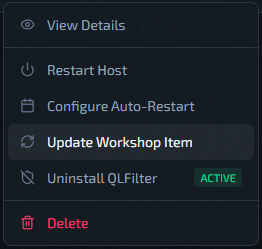
- Open the host row Actions menu.
- Click Update Workshop Item.
Fill The Modal
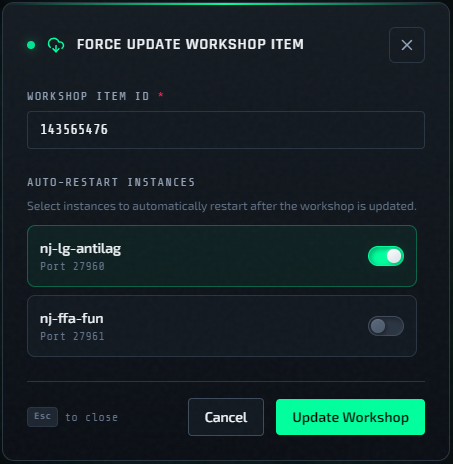
- Enter the numeric Workshop Item ID.
- Optionally enable Auto-Restart Instances for running servers that should restart right after the workshop update finishes.
- Click Update Workshop.
What The Restart Toggles Mean
- Running instances can be selected for automatic restart.
- Stopped instances may still appear in the list, but their restart toggle is disabled.
- If you skip restart, the updated Workshop content may not be picked up until the next manual or scheduled restart.
When To Use This
- A Workshop map or content pack was updated in Steam.
- A server is still using older Workshop content.
- You want to refresh selected servers now instead of waiting for auto-restart.
Verification
- Watch the affected instance statuses.
- If you enabled auto-restart, wait for selected instances to return healthy.
- If needed, confirm behavior in-game or with Server Logs.