Live Status
Live status shows near-real-time player and match state for each running instance.
Open Live Status
- In the Servers page, click the player count pill in the instance row:
 .
. - QLSM opens the full Live Status drawer.
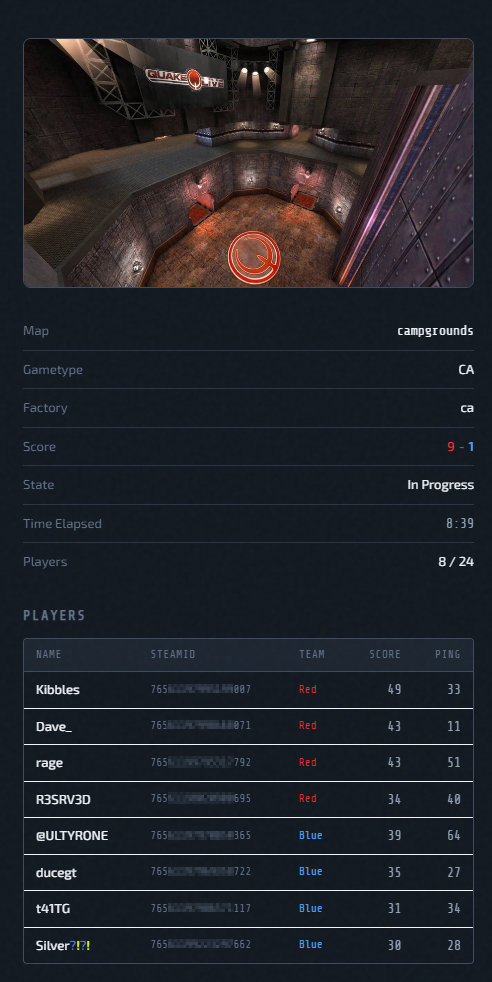
You can also open View Details for an instance and use the Live Status section there. Clicking the Players count pill in that section opens the same Live Status drawer.
Refresh Model
- UI polls
/api/server-statusevery 15 seconds. - If a specific instance has no live payload, UI shows an offline/empty state.
What You See
- Map preview (standard map art or workshop preview when available)
- Gametype/map/score/time metadata
- Player list with team-aware grouping/sorting rules
- Colored Quake names rendered in UI
Player Sorting Logic
Team modes (CA/CTF/TDM/etc.):
- Red team first, then Blue, then Spectator, then Free
- Players sorted by score within competitive teams
Non-team modes:
- Active players by score
- Spectators placed after active players
Map Preview Fallback Chain
- Standard preview mapping for known map names
- Workshop preview URL (if workshop item exists)
- Direct standard map filename guess
- Default fallback preview image
Notes
Live status is observational data. Operational actions (restart/stop/logs/RCON) remain in the instance action menu.