Host Actions Menu
Open from host row Actions in the Servers page.
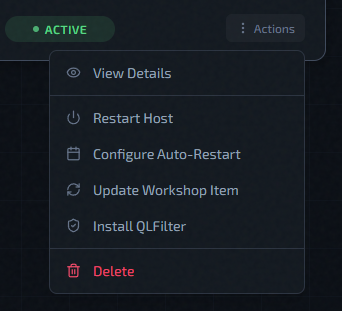
Actions In This Menu
- View Details: opens host details drawer.
- Restart Host: queues host reboot flow. If the host takes longer than expected to come back and briefly shows Error, QLSM keeps probing it and restores it to Active automatically once it's reachable again — no manual action needed in that case.
- Configure Auto-Restart: opens restart schedule modal.
- Update Workshop Item: triggers workshop update on this host.
- Install/Uninstall QLFilter: depends on current QLFilter state.
- Re-run Host Setup: re-applies the host configuration playbook on an existing host.
- Delete / Remove: removes host from management (or destroys cloud host).
What QLFilter Is
QLFilter is a host-level anti-DDoS filter. It uses eBPF/XDP to drop reflection garbage (DNS, SSDP, and similar noise) at the network driver level before it ever reaches QLDS. One installation covers all instances on the host.
For a full explanation: QLFilter
Operationally:
- Use Install QLFilter on new production hosts.
- Use Uninstall QLFilter only when you intentionally want it removed.
QLFilter Behavior In Menu
The QLFilter action changes based on current QLFilter status:
not_installed,error,unknown-> Install QLFilteractive,inactive-> Uninstall QLFilterinstalling,uninstalling-> action shows busy state and is locked
While QLFilter is installing/uninstalling, other host management actions are also blocked.
Update Workshop Item: Practical Use
- Open Update Workshop Item from host actions.
- Enter numeric Workshop Item ID.
- Optionally pick running instances for automatic restart after update.
- Submit and monitor instance status.
Full guide: Update Workshop Item
This is commonly paired with scheduled restart policy: Configure Auto-Restart
Re-run Host Setup
Re-run Host Setup re-applies the host configuration playbook to an existing host without reprovisioning it. Use this after a platform update that changes how the host is configured, when a previous setup run failed partway through, or to pick up infrastructure changes on an already-active host.
The action is available when the host status is Active or Error. While it runs, the host enters Configuring status and other management actions are blocked.
Self-hosted hosts — Re-run Host Setup is available but does not modify Redis connectivity (self-host always uses TCP). On cloud and standalone hosts it applies the full setup, including any Redis configuration changes introduced in a platform update.
Re-running host setup also refreshes the host's game and RCON port allow-list, so run it if a host set up on an older platform version needs the full range of instance slots to be reachable.
After the playbook completes, the host returns to Active status.
Running instances are automatically restarted after a successful run. Plan for brief server downtime if you run this on a live host.